
Automation tools have become essential for modern developers and digital businesses.
Whether you’re building integrations, automating repetitive tasks, or connecting APIs across multiple platforms, automation platforms can save hundreds of hours of manual work.
Two of the most popular automation tools today are n8n and Zapier.
Both platforms allow users to create automated workflows that connect different apps and services. However, they are designed with different audiences and philosophies in mind.
Zapier focuses on simplicity and ease of use.
n8n focuses on flexibility and developer control.
So which one is actually better for developers?
In this guide, we’ll explore the differences between n8n and Zapier in terms of architecture, flexibility, pricing, performance, scalability, and real-world use cases.
By the end, you should have a clear understanding of which platform fits your workflow best.
What Is Zapier?
Zapier is one of the oldest and most widely known automation platforms.
It allows users to connect thousands of applications using simple “if this, then that” logic.
For example:
If a new form submission happens → send a Slack notification.
If a new customer signs up → add them to Google Sheets.
Zapier calls these automations Zaps.
Its main advantage is simplicity. Even non-technical users can build basic workflows quickly.
Zapier integrates with thousands of services, including:
- Gmail
- Slack
- Google Sheets
- Shopify
- Trello
- HubSpot
- Notion
Because of its simplicity, Zapier is widely used by marketers, small businesses, and non-technical teams.
However, simplicity also introduces limitations — especially for developers.
What Is n8n?
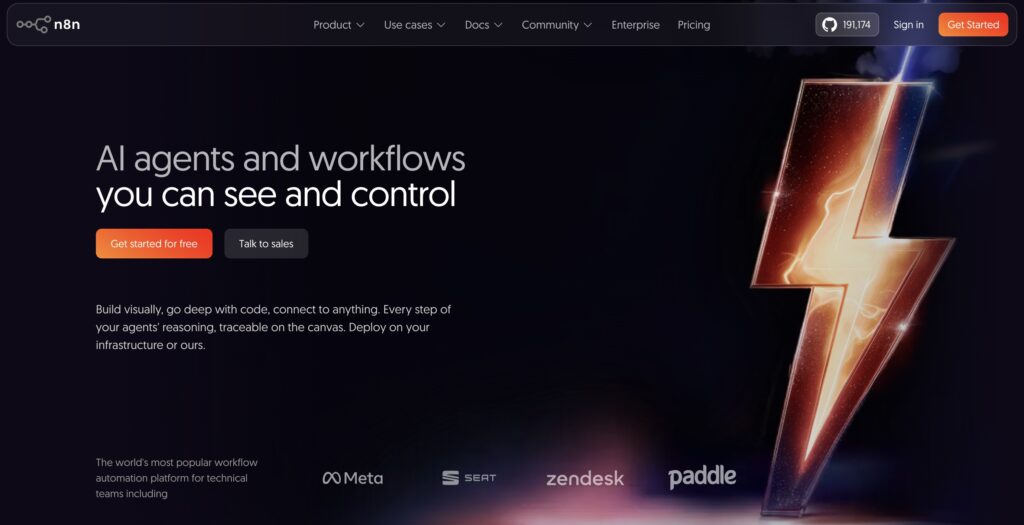
n8n (short for “nodemation”) is a workflow automation tool designed with developers in mind.
Unlike Zapier, n8n can be self-hosted, meaning you can run it on your own server.
Instead of simple “if this then that” logic, n8n provides a powerful workflow engine that allows:
- Advanced branching
- API integrations
- Custom JavaScript logic
- Data transformation
- Conditional routing
- Complex automation systems
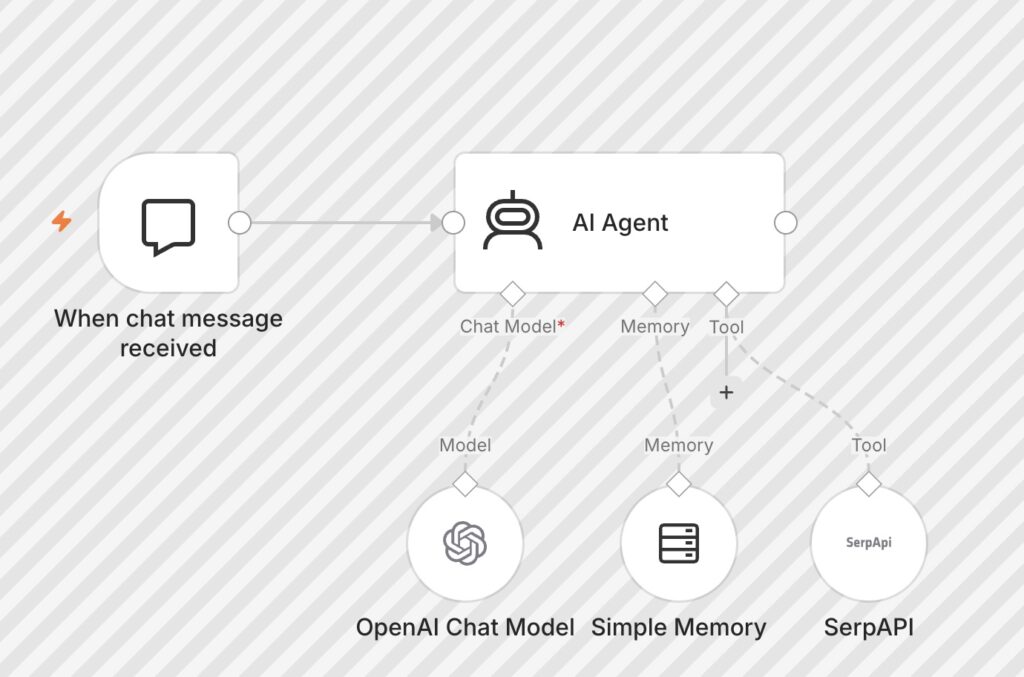
n8n workflows are built visually, using nodes connected together in a flow-based interface.
Each node performs a specific task such as:
- HTTP request
- database query
- sending email
- parsing JSON
- running custom scripts
Because of this architecture, n8n behaves more like a lightweight automation platform rather than a simple automation tool.
Key Philosophy Differences
Understanding the philosophy behind each platform helps explain their differences.
Zapier Philosophy
Zapier prioritizes:
- Simplicity
- Ease of use
- No coding required
- SaaS convenience
The goal is to allow anyone to automate tasks quickly.
n8n Philosophy
n8n prioritizes:
- Flexibility
- Developer control
- Self-hosting
- Custom workflows
- Advanced integrations
The goal is to allow developers to build powerful automation systems.
Workflow Complexity
One of the biggest differences between Zapier and n8n is workflow complexity.
Zapier Workflows
Zapier workflows typically follow a simple structure:
Trigger → Action
Example:
New Stripe payment → Send Slack message.
Zapier supports multi-step workflows, but complex branching can become difficult and expensive.
n8n Workflows
n8n workflows allow:
- Multiple triggers
- Conditional branching
- Loops
- Parallel execution
- Data transformations
- Custom logic
Example workflow:
Webhook
⬇
AI classification
⬇
Database lookup
⬇
Conditional branching
⬇
Send different replies
This makes n8n far more flexible for developers building complex systems.
Customization and Developer Control
For developers, customization is extremely important.
Zapier Customization
Zapier allows some customization through:
- Webhooks
- Code steps
- App integrations
But there are limitations.
Developers are restricted to Zapier’s platform environment.
You cannot control the infrastructure.
n8n Customization
n8n allows full customization.
Developers can:
- Run custom JavaScript
- Connect any API
- Modify nodes
- Write custom integrations
- Access environment variables
Because n8n is open-source, developers can even modify the platform itself.
This level of control is impossible with Zapier.
Hosting Options
Hosting is another major difference.
Zapier
Zapier is fully cloud-hosted.
Users cannot host Zapier themselves.
Advantages:
- No server management
- Automatic scaling
- Managed infrastructure
Disadvantages:
- Limited control
- Data stored on Zapier servers
- Pricing tied to usage
n8n
n8n offers multiple hosting options:
- Self-hosted VPS
- Docker deployment
- Cloud version
- Enterprise hosting
Self-hosting gives developers full control over:
- data storage
- workflow execution
- security policies
- scaling infrastructure
[SECURING MY ENVIRONMENT: MY VPS SELF-HOSTING EXPERIENCE] “Because I always prefer full customization and absolute data ownership over ready-made, restrictive SaaS tools, I skipped the basic cloud plans and deployed a self-hosted instance of n8n using Docker on a Hostinger VPS. This setup gives me a secure, private environment where all my critical API keys, tokens, and sensitive database credentials never leave my own server infrastructure. Furthermore, running n8n on my own virtual private server allows me to monitor resource allocation (CPU and RAM) and tweak the backend configuration to handle complex automation pipelines exactly the way I want.”
Pricing Comparison
Pricing can become a major factor as workflows grow.
Zapier Pricing
Zapier charges based on:
- number of tasks
- number of zaps
- usage limits
Higher plans can quickly become expensive if automation scales.
For businesses running thousands of tasks daily, Zapier costs can grow significantly.
n8n Pricing
n8n offers two main options:
- n8n Cloud subscription
- Self-hosted VPS
Self-hosting dramatically reduces costs for heavy automation workloads.
Instead of paying per task, developers pay only for server infrastructure.
[FINANCIAL PREDICTABILITY: FIXED SERVER COSTS VS. METERED TASKS] “If you try to scale a content pipeline or an automation engine on Zapier, you will quickly hit a financial wall. Zapier charges you per individual task execution. Running a simple workflow every 30 minutes just to check a database can easily rack up thousands of tasks, pushing your monthly bill into hundreds of dollars. With my self-hosted setup, my total infrastructure cost is completely fixed monthly via my Hostinger VPS. Whether my workflows execute 1,000 tasks or 500,000 tasks a day, my cost remains exactly the same. For an indie developer managing multiple pipelines on a tight budget, this financial predictability is an absolute game-changer.”
For developers managing many workflows, n8n often becomes the more economical option.
Integration Ecosystem
Zapier has one major advantage: integrations.
Zapier supports thousands of apps.
This makes it easy to connect many popular services instantly.
n8n supports many integrations as well, but not as many as Zapier.
However, n8n allows developers to connect any API using HTTP nodes, which eliminates many limitations.
For developers comfortable with APIs, this flexibility often outweighs the smaller native integration library.
Performance and Execution Control
Zapier workflows run entirely on Zapier’s servers.
Users cannot control execution environment.
n8n allows more control over:
- execution concurrency
- queue systems
- workflow scheduling
- server resources
This makes n8n suitable for building backend automation systems.
Security and Data Ownership
Security requirements vary depending on the project.
Zapier stores workflow data in its cloud infrastructure.
For many businesses, this is perfectly acceptable.
However, some developers prefer controlling sensitive data.
Self-hosted n8n allows:
- private infrastructure
- internal network workflows
- restricted access
- data ownership
This is especially useful for automation involving private APIs or sensitive customer data.
Learning Curve
Ease of use differs significantly between the two tools.
Zapier Learning Curve
Zapier is extremely beginner-friendly.
Non-developers can create automations in minutes.
Most actions are simple to configure.
n8n Learning Curve
n8n requires more technical knowledge.
Developers may need to understand:
- APIs
- JSON
- authentication
- server hosting
- workflow logic
However, this complexity comes with greater power.
When Developers Should Choose Zapier
Zapier may be the better choice when:
- You need quick automation
- Your workflows are simple
- You want zero server management
- Your integrations already exist in Zapier
- Your automation scale is small
Zapier excels in convenience.
When Developers Should Choose n8n
n8n becomes the better option when:
- You need complex workflows
- You want full control
- You build automation products
- You need unlimited executions
- You prefer self-hosted infrastructure
For developers building systems rather than simple automations, n8n offers significantly more flexibility.
Real-World Example Use Cases
Developers often use n8n for:
- AI automation systems
- customer support bots
- SaaS backend workflows
- API orchestration
- marketing automation
- data pipelines
[MY PRODUCTION SYSTEM: THE AUTOMATED MARKETING ENGINE FOR MY APPS] “I built a production-ready content distribution engine hosted entirely on my server. The workflow initiates with a Schedule Trigger that scans a centralized Google Sheets calendar every 30 minutes. It filters rows where the status is set to pending and the publishing time is due, capturing the raw text and asset URLs. The system then handles the internal JSON mapping and data transformation to package the payload cleanly for different social media endpoints. It programmatically pushes these updates via native APIs to Twitter/X, LinkedIn, and Telegram channels to drive organic traffic to my mobile game store listings. Once a post is successfully published, n8n writes back to the spreadsheet, updating the row status to published. This complete marketing pipeline runs flawlessly in the background, cutting out hours of repetitive manual overhead and allowing me to focus 100% of my energy on writing native code.”
Zapier is often used for:
- marketing workflows
- CRM integrations
- notifications
- basic app connections
Final Verdict
Both n8n and Zapier are powerful automation tools.
However, they serve different audiences.
Zapier is ideal for users who want simple automation without technical complexity.
n8n is designed for developers who want to build flexible, scalable automation systems.
For developers specifically, n8n often provides more value because of:
- open-source architecture
- self-hosting capabilities
- advanced workflow logic
- full customization
That said, the best tool always depends on your needs.
If simplicity is your priority, Zapier may be enough.
If control and scalability matter more, n8n becomes a powerful automation platform.
Conclusion
Automation is becoming a core part of modern software development.
Tools like Zapier and n8n allow developers to build systems that save time, reduce manual work, and connect complex services.
Choosing the right tool depends on your goals.
Zapier offers convenience.
n8n offers control.
Understanding the strengths of each platform allows developers to choose the automation strategy that fits their workflow and long-term architecture.